


How to change the level of the elements?
Background
You can use the tool Remove Elements to move the elements of a current level (or selection of levels) to one or more different levels.
Steps to follow
Below is the method to move items to a different level:
1. Fly over a conduit element, for example. In this case, you can see that the level of the duct is "M-EF-65-40-M-Ventilation", or you can also see the same in the item information dialog.
2. Then access the Level Manager in the group Common tools, right-click on the source level in the event “M-EF-65-40-M-Ventilation“, and select Remove Elements.
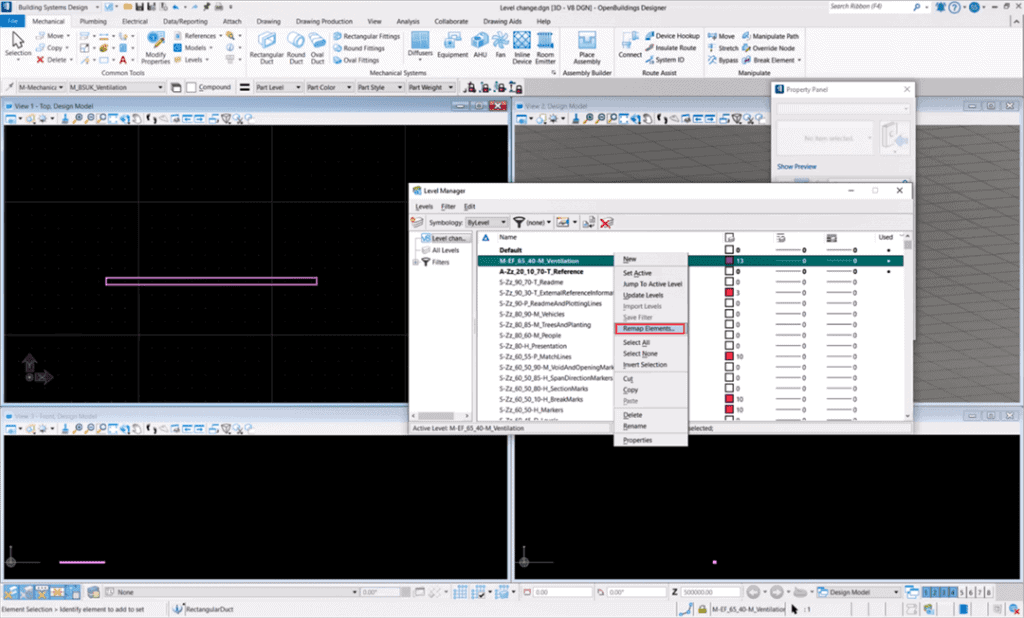
3. Select the name of the level of destination (A_CA_70_10_10-M_SiteAccommodation), then click on OK. Destination level has now been applied to all elements on the level that contained the duct.
