


Disabling of the back-compatibility alert message from the ProjectWise-managed workspace
Problem description
How do I disable the downward compatibility alert message in the PW environment even after checking the "No longer display this warning" box?

Solution
Even after checking the box "Do not display this warning again"When it always displays the alert box, open this file in your PW environment and if you use a managed workspace, you can access the user settings in PW Admin> right-click on the user> select the settings. There is a tab called Personal Workspace and you can see that the variable "TF_NOCOMPATIBILITYWARNING" is defined on 1.
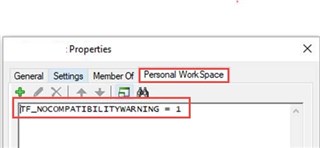
So, simply undefined this variable, then check the box "No longer display this warning".
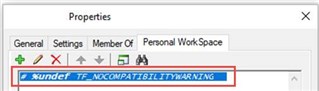
Finally, you can see that when you open files in OBD, the alert box does not show.
