Why the pencil-shaped icon remains displayed in the window Reference d
Background
In most cases, this DGN file contains several calls and this problem appears for the file. Whenever you open the file, a message will appear indicating that "obsolete information can be displayed".

In the "Reference" dialog box, you can see that a pencil icon appeared. After that, if you click on the option "Reload Reference", this icon does not disappear either.

Solution
To solve this problem, you must follow the steps mentioned below.
Steps to be accomplished:
Step 1
In the "DesignModel" (in Design Model View), overfly any call, then this dialog box appears.
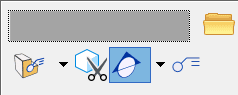
From there, deselect the icon "Show Legend".

Step 2
Now open the "Reference" dialog box and reload all references. Then you can see that the pencil icon no longer appears.