


Could not open cell library in OpenBuildings Designer
Problem
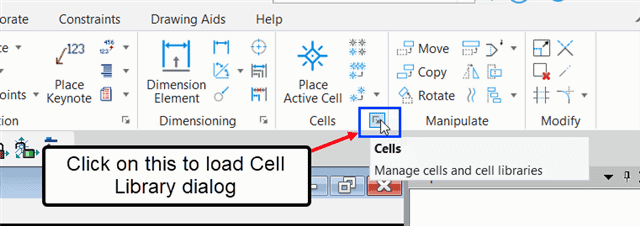
This problem often occurs when the user tries to place a cell from the "cell library" list. Users often try to open the Cell Library dialog box by clicking on the arrow at the bottom right of the "Cells" group on the "Annoter" tab (in the "Drawing" workflow).
...or by clicking on the "Browse Cell(s)" box in the Place Active Cell dialog box.

In both cases, the cell library does not charge.
Solution
To resolve this problem, please follow the steps below.
1. Go to the location below:
C: UsersusernameAppDataLocalBentleyOpenBuildingsDesigner
2. Remove or rename the directory called "10.0.0“

Then restart OpenBuildings Designer: you will now have access to library cells again via the methods mentioned at the beginning of the article.
