


The "Browse" option does not work when you join "ProjectWise Project"
Problem
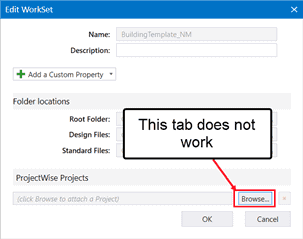
It is often seen at the time of ProjectWise Project with the current workset. When you click on the "Browse" tab, the "Associate Project to Work Set" page does not appear.
Solution
This problem usually occurs when a compatible Customer CONNECTION has not been installed. To solve this problem here, you must install the appropriate Customer CONNECTION. And after that, when you click again on the navigation option, the window "Associate the project to the workset" will appear.

