


Edit automatic recording option in OpenBuildings Designer
Background
How to modify the automatic recording of DGN files in OpenBuildings Designer.
Steps to follow
1. Behind the scenes, choose File > Settings > Configuration > Configuration Variables:

2. Look for the configuration variable: MS_DGNAUTOSAVE

Set now the desired value, which determines the backup frequency in seconds. For example, if it is set to 2 (default), an automatic backup will occur when there is no user activity for about 2 seconds.
Note(s):
To disable automatic backup, you can follow one of the following options:
Option 1 :
If variable MS_DGNAUTOSAVE is set to 0, the automatic backup will be disabled.

Option 2 :
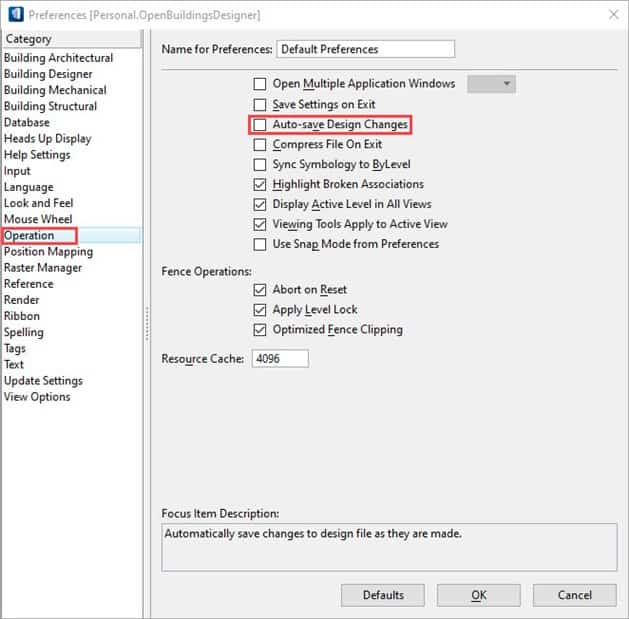
1. Behind the scenes, choose Settings > User > Preferences :

2. In category Operation, uncheck Auto-save Design Changes – automatic backup will be disabled.
Option 3 :
1. Manually edit .ucf, .pcf or standard files.cfg
2. Add the line: MS_DGNAUTOSAVE = 0
3. Save file
4. Restart OpenBuildings Designer
