



OpenTower Designer
Design your telecom infrastructure faster and more precisely
OpenTower Designer simplifies the design and management of telecom infrastructure. Optimize each lap accurately, reduce risks and save time with smart planning. From plan to reality, create projects that are reliable, efficient and perfectly tailored to your needs.
OpenTower Designer: Accuracy and Efficiency for Telecom Projects
Precision at the top
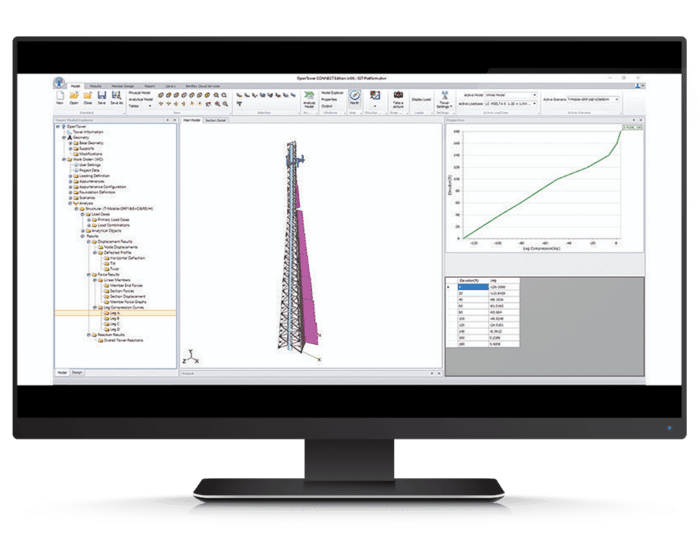
OpenTower Designer is a solution dedicated to the analysis and design of telecommunications towers. It quickly creates structures with a complete library of panels and equipment, automatically generates loads in various topographic configurations and performs design checks. It facilitates the modelling of towers (trilled or hijacked) and equipment (antennas, supports, linear accessories), while respecting American, European or Australian standards. Reports are fully customizable, and physical models can be created with hierarchical modification layers and revision history for accurate project tracking.
Configuring Countersell Element Libraries
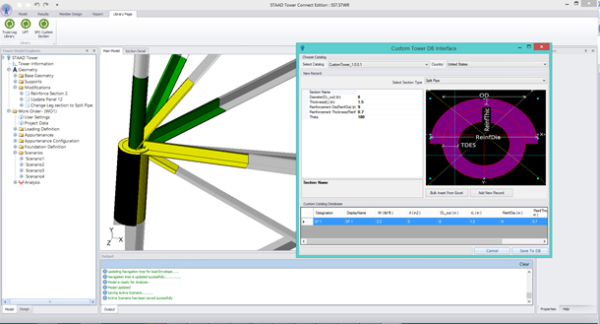
Create custom XML libraries for your bracing panels, torque arms and mesh batteries. Easily configure your own files or use built-in, extensible and configurable counterfeit types from the outside.
Creating realistic images and accurate models
Enjoy a modern graphic environment for a realistic visualization of your 3D models. Discrete and linear installations are represented on a scale, with precise positioning of equipment, power lines at each level and linear attachments.
Customization of equipment libraries
Customize a library of complete equipment including antennas, parasols, transmission lines, attachment equipment and tower mounted devices, from the main manufacturers, thanks to the integrated tools.
Design connections
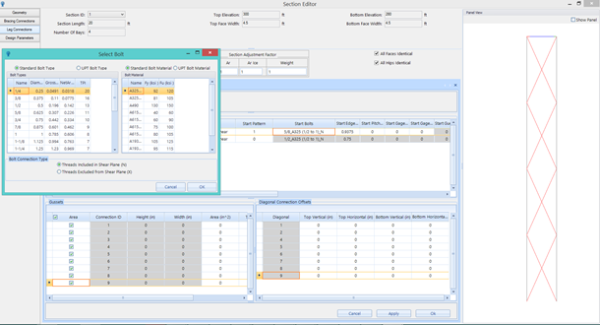
Define element connections using various bolt models, including predefined configurations. Automatically integrate their impact into design calculations and verify their structural effectiveness.
Definition of external load
Configure the cluster training of linear and various auxiliary elements, including those for structural reinforcement.
Design of the foundation of the tower
Design tower foundations according to U.S. standards, for tower feet and anchoring points of haubans, including type foundations pad-pier, drilled piles, stud anchors and mast foundations. Automate the design according to the most critical load cases and assess the foundation's compliance with the defined criteria.
OpenTower Designer
OpenTower Designer makes the design of telecom towers simple and fast. With integrated guides, video tutorials and complete support, you design your telecom towers with confidence and efficiency.
Key Features
Self-supporting towers
Self-supporting towers 3 sides and 4 sides
|
Knotted masts
Knotted masts
3 sides and 4 sides
- Controls of elements (TIA-222 Rev F, G, H).
- Verification of the fittings of the components (types of fittings: bolted, welded; verification of the failure mechanisms: shear bolt, shear block of element, load of element and plate).
- Checking the haubans.
- Verification of the attachment of the haubans (different types).
- Verification of anchor bolts.
- Verification of segment splicing connections (types of fittings: flange, shear sleeve, splicing; verified components: plates, bolts, welds, stiffeners).
- Verification of foundations (pad-pier, tethered foundations).
Monopoles
Monopoles
Conical, tiered and hybrid
- Controls of poles (TIA-222 Rev F, G, H)
- Control of bolted splicing connections (controlled components: plates, bolts, welds, stiffeners)
- Base verification (checked components: anchor bolt steel, stiffener plates, stiffener welding)
- Verification of the foundations (mast pad, drilled pier).

User Word
OpenTower [Designer] surpasses its competitors in terms of functionality, ease of use and analytical depth.
The graphical user interface makes it easy to see what equipment is on a tower, including the side and elevation; the foundation analysis module is complete; An integrated fastening analysis module makes it easy to model and evaluate complex fasteners and the software offers an innovative method to create the history of a tower.
— Aaron Broderick, Director, Johnson Broderick Engineering, LLC
Licensing Options
Annual rental
The simple and efficient way to use software over a fixed period of 12 months. The license is associated with the user and can be used on several posts (but not simultaneously).
The annual subscription includes a number of "keys" that can be exchanged for training or accompaniment (mentoring).
Perpetual licence
A perpetual license is a unique purchase, it can be accompanied by an annual maintenance contract called SELECT. The latter assures you that your software is always up to date, 7 days a week and 24 hours a day support and allows for the buoyancy of licenses among other services.
The SELECT contract offers maintenance for your perpetual licenses including various benefits:
- Floating licences
- Software updates
- Balancing the licensing portfolio
- Technical assistance 24/7, 365j/365
- CONNECT services