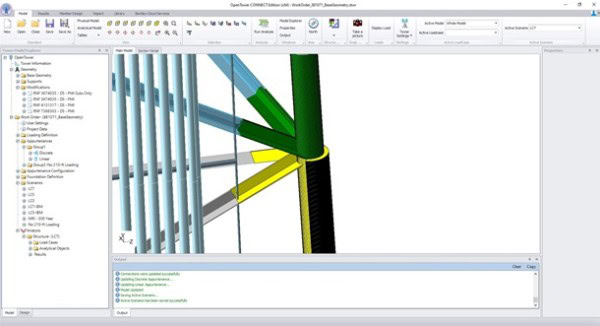



3D modeling of a telecommunications tower with beCAD, optimized for OpenTower Designer.

Analyze transmission tower attachments

Perform the analysis of transmission tower fixings with dedicated software. Press a complete library to easily model sector frames, platforms and T-arms, and automatically generate loads and load combinations.

OpenFlows Storm tool for storm water management and flood analysis.

Designs in line with standards

Design your transmission tower fasteners according to TIA-222-H by using data bases of shapes covering the United States, Europe, Asia, Africa and the Americas.

BeCAD software for water management in OpenFlows Water.

Create realistic reports and visualizations

Graphically view antennas and equipment mounted in wired or rendered mode with a simple click. Generate detailed reports on attachments, including accessories tables, applied forces, mechanical behaviors, success/failure test results, and integrated critical images.

OpenTower CONNECTED Icon

Key Features

Analysis of transmission tower attachments

Analyze transmission tower attachments

Analyze transmission tower attachments with software designed specifically for this use. Press a complete library to generate sector frames, platforms, T arms and other components, while automating the creation of loads and load combinations.
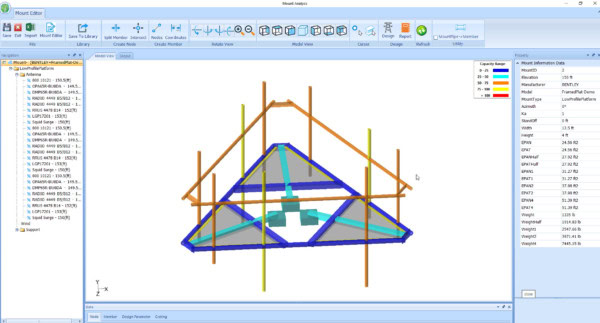
Computer screen displaying OpenTower structural analysis software with a 3D model of a roof farm and various analytical data on the interface.

Designs in line with standards

Design your transmission tower attachments according to TIA-222-H, using profile databases available for many countries, including the United States, United Kingdom, Europe, India, China, Japan, Australia, Canada, Brazil, Mexico, Germany and South Africa.

Screenshot of the 3D engineering software interface showing a detailed structural model with coloured elements, accompanied by menus, toolbars and a project management panel including OpenTower for improved fixation analysis.

Display and create realistic reports and visualizations

Graphically view antennas and equipment mounted on towers in wired or rendered mode, with a simple click. Produce detailed reports on attachments, with accessories tables, applied forces, mechanical behavior, success/failure tests and integrated critical images.


The OpenTower software window displays a 3D model of a mobile phone tower with multiple antennas, with fixation analysis features. The interface includes menus, a navigation panel on the left and a control console in the lower part.

Licensing Options

Annual rental

Perpetual licence