


WHAT IS A QTL?
The Quarterly License to Terme (QTL, for Quarterly Term License) is a formula proposed by Bentley Systems that allows access to software for a period of three months. This license is automatically charged as soon as a certain threshold of use is exceeded.
Operation:
When you use Bentley software without a permanent license or an active annual subscription, your use is recorded by the Bentley system.
Bentley applies a rulepoint use If you exceed the user tolerance limit at no extra cost (usually set at 10 minutes), this will automatically trigger the billing of a quarterly licence (QTL).
You will then receive an invoice covering a period of three months, whether you have used the software for a few moments or daily throughout the quarter.
Why did you get a QTL bill?
One invoice QTL can be generated in several cases of use of Bentley Systems products. The following are the main situations that may result in this invoicing:
- Use without active license : If Bentley software is used while no permanent or annual license is associated with the user, access can be recorded as a one-time use, triggering QTL billing.
- Exceeding the number of licences available : If your company has a limited number of licenses and an additional user launches the software, this can result in activation of a quarterly license.
- Involuntary opening of software : Sometimes a Bentley software can be opened by mistake, even briefly. If the use exceeds the user tolerance threshold at no extra cost (often 10 minutes), a QTL license may be charged.
- Unforeseen tests and tests : An employee can activate a product to evaluate its functionality without being aware of the billing rules.
- Inadequate session management : If a user forgets to close a software after use or if sessions remain active on multiple devices, this may trigger additional billing.
What next?
- Visit Bentley Portal Check who used the software, when and for how long.
- Ask for a commercial gesture : If use was minimal and clearly accidental, Bentley could consider a commercial gesture (at their discretion).
- Challenge the bill : If you think it is an error or an involuntary test, you can follow the challenge procedure set out below.
CONTECTING A QTL FACTURE
Log in to Bentley Support Portal.
Choose the category « Invoicing assistance ».

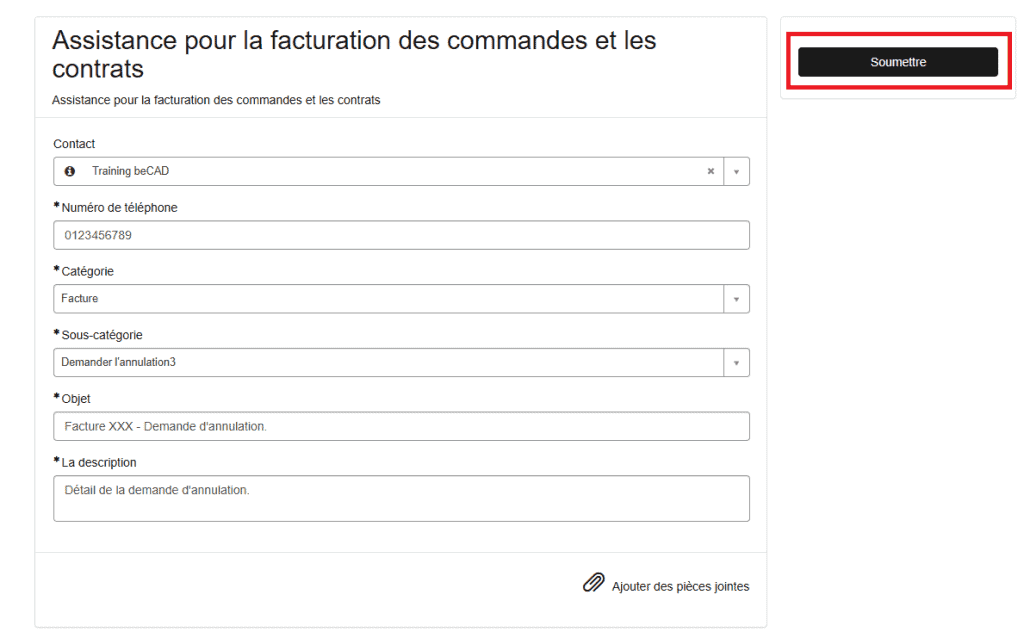
You are then redirected to the assistance form for billing orders and contracts.
Fill in the fields and take care to select the option « Invoice » for field « Category » and option « Request Cancellation » for field « Subcategory ».

In the field « Subject matter », we advise you to mention the invoice number. For example, you can write the following object: « Bill XXX – Request for Cancellation ».
In the field « Description », detail to Bentley why you want to cancel your QTL bill.
If you have usage reports that can justify and support your cancellation request, we advise you to attach screenshots of these by adding them to your ticket attachments.

Once completed, you can submit it to Bentley.
You will then receive a confirmation email indicating that your service request has been created.
You can add comments to your tickets via the tab « My lists ».

You should receive an email notification whenever a Bentley employee adds a comment to your ticket.
