


This article is a free translation made by beCAD, you can consult the original (version 2.0 updated on 28/09/2025) Here.
Virtuoso licenses are prepaid licenses, which allow organizational administrators to assign access to Bentley (SES) CONNECT Edition eligible products to specific users. With the Virtuoso licenses, users are granted unlimited access to the product for the duration of the license, which is one year.
Once the purchase process is complete, the administrator of the organisation must assign the Virtuoso license to the end user via the rights management (Bentley CONNECT Center) before the license can be used. If a Virtuoso license remains unallocated and the end user already has a license for products covered by SELECT, any use of the license will be recorded as « Mutualized » (pooled) and will contribute to maximum use values. If an end user has purchased a Virtuoso license without having any products covered by SELECT, the application will not activate until the Virtuoso license has been granted to the user via rights management in the Bentley CONNECT Center.
NOTE : The execution contact does not have the same role as an administrator. See the difference between these roles.
Note on behavioural change for the simultaneous use of individual user licenses:
Users of Virtuoso licenses have been informed that, from 22 January 2025, the simultaneous use of certain Virtuoso licenses will be prohibited. There is no limit on the number of computers on which a Virtuoso license can be used, but the user can only use the license on one computer at a time. This includes online use (in real time) and offline use with a license « borrowed » (checked-out) Starting these products under license in offline mode (i.e. disconnected and not borrowed) will not be allowed.
If the user tries to start the same license on a second computer (or borrow the same license for a second computer), use will be refused. In recent versions of CONNECTION Client (23.0.1.25 or later), the user will receive the name of the machine currently in use (e.g.: « It seems your Virtuoso license is active on another machine. Please close the application on "machine name" and try again. »). If the user stops (or returns) the use of the license on the first computer, it can restart (or borrow) the license on the second computer.
Organisation administrators can consult products limiting simultaneous use on the Virutuoso licensing page in rights management in the Bentley CONENCT Center. Administrators can also monitor the limited Virtuoso rights in the Real-time usage ratio of limited Virtuoso licenses (Realtime Capped Virtuoso Usage Report).
How to assign a Virtuoso license?
You can see in detail the procedure to apply for a Virtuoso license by clicking Here.
To grant a Virtuoso license, administrators must ensure that the desired users are added to the organization's account. Once users are added, the administrator can begin to assign licenses by following these steps:
1. As an administrator or co-administrator, you can visit the Subscription services portal and click on the copyright/license management icon. Virtuoso license administrators will need to access the Virtuoso page (this link can also be used by administrators): https://connect-entitlementmanagement.bentley.com/entitlement/practitioner
2. Click the tab Virtuoso (Main page – Your subscription type). If the icon is not visible, open the country drop-down menu at the top of the page and select Global.

Alternatively, you can access the Virtuoso license from the side navigation: Parameters > Licenses Virtuoso.

4.In the pop-up window that appears, use the field to search for the user by name or email address.
5. After selecting the user, click the button « Assign » – the license will be issued and the user will receive an e-mail notification confirming the assignment of the Virtuoso license.
NOTE :
If you cannot grant a Virtuoso license, make sure that the user you are trying to grant the license has a valid rights country in user management.
What happens if a Virtuoso license remains unallocated?
Unallocated Virtuoso licenses will not be used in the rights applications of the users of the organization or in the billing of the generated use while the Virtuoso license remains unallocated. To take full advantage of the Virtuoso license during its duration, it must be assigned to a user.
Reminders will be posted to administrators in the Subscription services portal and in Rights management/licences if there are unallocated Virtuoso licenses.
Does an unallocated licence influence or extend its expiry date?
No, the Virtuoso license is active for a period of one year after purchase and processing in the system. From then on, it becomes available in the rights/licences management portal and is ready to be assigned to a user. At this stage, it is active and not assigned until an administrator assigns it to a user. Its start date will be the time of purchase/processing, and the expiry date will be one year from the start date.
An unallocated Virtuoso license has no influence on the start and expiry dates as they are defined by the time of purchase, not by the time of award.
What if I have to reallocate the Virtuoso license to another user?
A Virtuoso license can be re-attributed as many times as necessary on the first day it is assigned to a user. If it was originally attributed to the wrong user, it will be enough to change it within the first 24 hours without any particular action.
After this initial 24-hour period, the Virtuoso license will be locked for 30 days. At the end of this 30-day period, it may be reassigned, if necessary. Any new reallocation will begin a new 24-hour period for user allocation, followed by a 30-day lock.
NOTE :
If you need to remove a user from the organization's account and re-allocate a Virutoso license from it, make sure you re-allocate the license before removing the user from the user management. If you remove an assigned user, the rights/licences management page will display "Not Found User" for the Virtuoso license and you will not be able to reassign it. In this case, please open a service request, choose « Licensing assistance » as a category and include deleted user details in the description.
What if I have to change the email address of a user already assigned to a Virtuoso license?
If you need to change the email address of an assigned user, make sure you do not delete the user in user management. Instead, change the email address of the user.
If you have already deleted user in user management and the rights/licences management page displays « User not found » for the Virtuoso license, please open a service request, choose « User administrator support » as a category and include deleted user details in the description.
How does an assigned user know that he uses a Virtuoso license?
Whenever a Virtuoso license is granted, the end user receives a notification of the award. The user can then activate the product either by using the enabler or by running the product. The Virtuoso license is indicated by the license type in the tab « Rights Management/Licensions ».
Does the affected user have to perform an operation on their computer to use the Virtuoso license?
The end user must upgrade their CONNECTION client to version 10.00.18.x or higher.
How to download the software?
Only users who are granted the Virtuoso license can download the software. Shortly after the grant of the Virtuoso license, they will receive an e-mail informing them of the allocation of rights and also containing a software download link.
NOTE :
Account/co-administrators do not have the privileges to download the software as part of the Virtuosity command, unless a Virtuoso license is granted.
Are the features of a Virtuoso license and a perpetual license the same?
Within the product, the end user will probably see no difference between a Virtuoso license and a traditional perpetual license. Since users with a Virtuoso license have unlimited access to eligible Bentley products, subscription service features such as access controls or threshold alerts are disabled.
What license is used if the account has both a perpetual license and a Virtuoso license for the same product?
If an account has both a perpetual license and a Virtuoso license for the same product, use will automatically be assigned to the Virtuoso license when a user designated for that license launches the product. This is due to the fact that the Virtuoso licence is a priority over the perpetual licence.
Can I borrow a Virtuoso license?
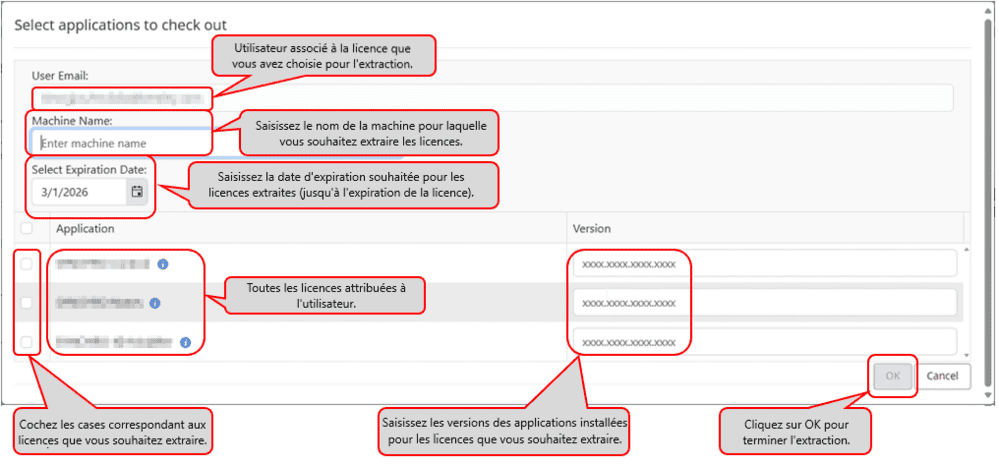
Yes, loans are available for Virtuoso licenses. The user must connect to the Internet at least once to borrow the license in Bentley Licensing Tool. For the steps to follow, see: Bentley Licensing Tool: Licensing Tab.
From the admin portal:
Click on the "Validate License" button.
Fill in the blanks and click "OK".
How to configure license alerts for the Virtuoso license?
There is no alert parameter for Virtuoso licenses. This type of license does not generate over-use and, therefore, license alerts do not apply.
Can I use my Virtuoso license on several machines?
Although the product can be installed on multiple machines at the same time, in accordance with the general conditions of a Virtuoso license, the named user cannot share his license with another user. The license must only be used by that user named on one computer at a time.
Can I use my Virtuoso license for a V8i application (pre-ESS)?
Virtuoso licenses are only available for the latest CONNECT Edition applications. They are designed to use the Subscription Entitlement Services license model and are connected to an assigned email ID. Older versions cannot be used.
What products are available for Virtuoso licenses?
Most popular Bentley offers are available. Please consult the list via our online shop.
